¶ Server Owner Setup Guide
Get Arkon running on your Ark server in about 10 minutes. The fastest way is the /setup wizard, which connects and tests your first server for you. Prefer to do it by hand? A manual path is below too.
New to Arkon? Check out the Glossary if you encounter unfamiliar terms, or the FAQ if you run into issues.
¶ ✅ Prerequisites Checklist
Before you begin, make sure you have:
- An Ark server (ASE or ASA) that you can manage - this guide won't teach server hosting
- RCON enabled on your server with a known port and password
- A public IP address that does not change (or a Dynamic DNS hostname)
- Port forwarding set up for your RCON port
- Basic Discord knowledge (roles, permissions, channels)
Not sure what some of these mean? Here is the plain-language version:
| Term | What it means |
|---|---|
| RCON | A remote console that lets Arkon send commands to your server. Enable it in GameUserSettings.ini with RCONEnabled=True and RCONPort=27020 (27020 is the default for both ASE and ASA). Your RCON password is the ServerAdminPassword from that same file. See RCON in the glossary. |
| Public vs local IP | Arkon connects to your public IP (the one at whatismyip.com), not a local 192.168.x.x or 10.x.x.x address. |
| Port forwarding | If you self-host, your router must forward the RCON port (TCP) to the PC running the server. Router guides. |
| CGNAT | If your ISP puts you behind Carrier-Grade NAT you cannot port forward. Ask your ISP for a public IP, or use a server host that gives you one. |
| Dynamic IP | If your IP changes on its own, use a free Dynamic DNS service (No-IP, DuckDNS) and give Arkon the hostname instead. |
Using a game host? Most providers support RCON and show the port and password in their control panel. Nitrado (ASE only) does NOT support RCON, so Arkon cannot work with ASE on Nitrado.
If your router or firewall filters by address, whitelist Arkon's IP
51.79.109.160and allow TCP inbound on your RCON port.
👉 Invite Arkon to your Discord
Make sure the bot has permission to Send Messages and Embed Links in your channels!
¶ Path A: The /setup Wizard (Recommended)
The quickest way to connect your first server. Run the slash command in your server:
/setup
The wizard walks you through everything with buttons and pop-up forms. Have your server's IP address, RCON port, and admin password ready. It will:
- Pick your game - ARK: Survival Evolved (ASE) or ARK: Survival Ascended (ASA).
- Check prerequisites - a built-in checklist with an I Need Help button covering public IP, dynamic DNS, port forwarding, firewall, and hosting providers.
- Name your cluster - a group for your servers. Use something simple like
pvp,pve, ormain(letters and numbers only). Even with one server you need a cluster. - Enter server details - server name, IP address (without the port), RCON port (default
27020), and admin password. - Test the connection - Arkon live-tests RCON before saving. If something is wrong, it tells you exactly what (wrong password, timed out, connection refused) and how to fix it, then lets you edit and retry.
- Set chat channels - pick a server chat channel (recommended, shows this server's chat plus command feedback) and optionally a cluster chat channel (combined chat from all servers in the cluster). You can skip and do this later.
- Crossplay (ASE only) - if your server is Xbox/Win10 crossplay, the wizard points you to autofriend.arkonbot.com and the
+addme/+gamertag/+xsapicommands.
When it finishes, your cluster and server are saved and connected. Jump to After Setup to finish configuring.
Already ran
/setupbefore? Running it again shows a summary of your current clusters and servers with quick links instead of starting over.
¶ Path B: Manual Setup
Prefer to set things up by hand, or adding more servers later? Use these commands.
When giving command examples below, you do not include the
<>or[]- those are just placeholders.<required>means you must provide a value,[optional]means it's optional. The default prefix is+; change it any time with+set serverprefix <newprefix>.
¶ Step 1. Create a cluster
Even with one server you need a cluster. This is separate from Ark's own "cluster" concept; it is how Arkon groups related servers.
+addcluster <cluster_name>
Example:+addcluster MyArkCluster
¶ Step 2. Add a server to the cluster
Before adding your server, confirm:
-- You have a static or semi-static public IP (CGNAT will not work).
-- The PC hosting your server has a static private IP (assigned by your router).
-- The RCON port is forwarded in your router to that private IP.
-- If Windows, a firewall exception exists for TCP inbound on the RCON port.
-- If applicable, your router/firewall has the bot IP51.79.109.160whitelisted.
+addserver <cluster_name>
Example:+addserver MyArkCluster
A menu pops up:
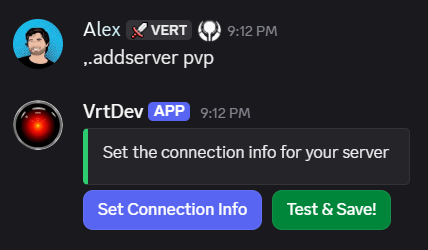
Click Set Connection Info:
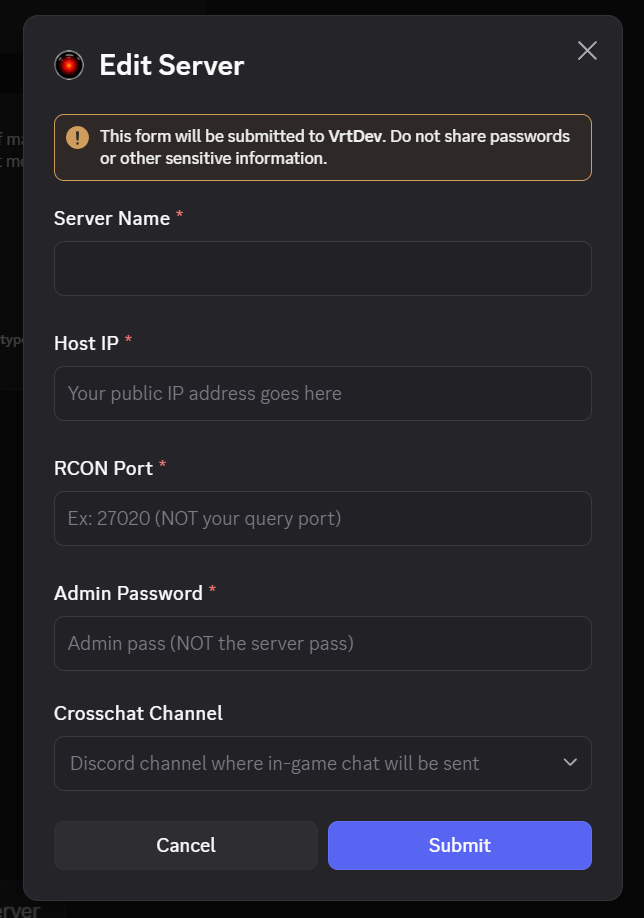
Enter your server's connection info and click Submit:
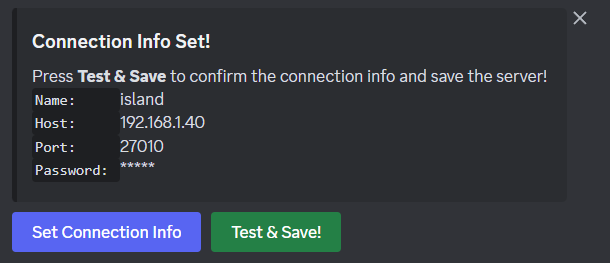
Review the details, then click Test & Save! to test the connection and save.
The server is only saved if the connection succeeds. Fix things on your end and click test again until it works.
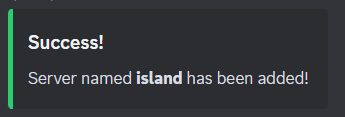
Your server is added! The configured channels should start streaming logs from your server.
¶ After Setup
Both paths connect your server, but a few settings are still worth doing. (The wizard recommends these on its success screen.)
¶ 1. Set your Admin and Mod roles
Arkon uses Red-DiscordBot's role system. Admin roles get full configuration access; Mod roles get moderation commands like +banplayer, +rcon, and +findplayer but cannot change settings.
+set roles addadminrole <role>Example:+set roles addadminrole @ArkAdmin
+set roles addmodrole <role>Example:+set roles addmodrole @ArkMod
Tip: Run these multiple times to assign more than one admin or mod role.
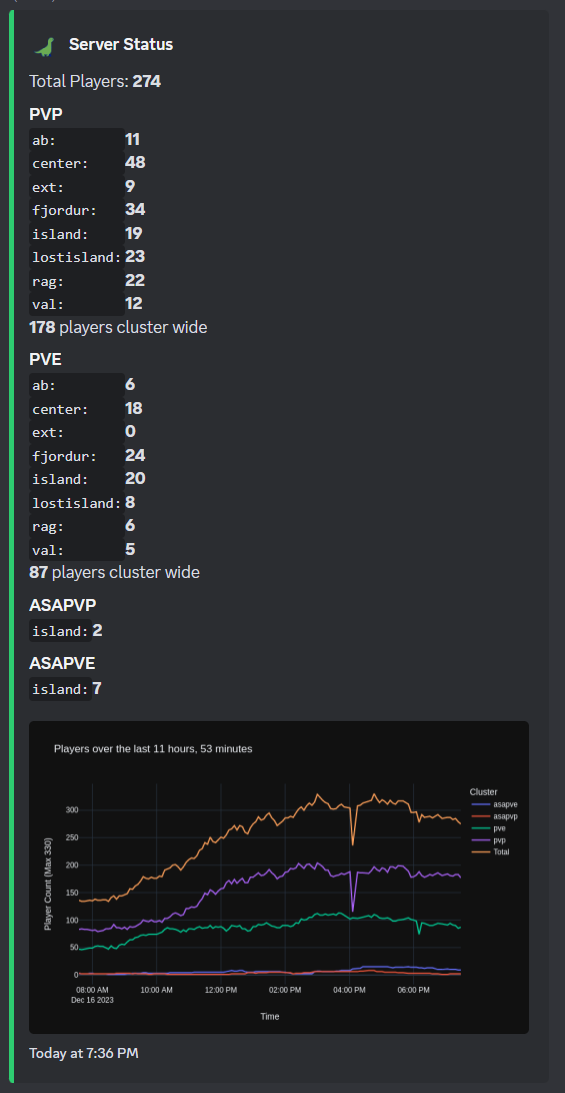
¶ 2. Set the status channel
A live-updating embed showing all your servers with a player-count graph.
+serverstatus channel #status-channel
+serverstatus time <seconds>Example:+serverstatus time 3600shows the last hour.
¶ 3. Set your timezone
So the status graph uses your local time.
+arkset timezone <YourTimezone>Example:+arkset timezone US/Eastern
¶ 4. Set the cluster type
Controls registration behavior. Options: xbox, steam, both. For ASA, use both.
+arkset clustertype <type>
¶ ✅ Verify It Works
Confirm your setup actually took:
+checklist- shows which features are configured and what is still missing.+viewservers- opens the server menu; your server should be listed.+players- shows who is currently online across your servers.
If your server appears and +players responds, you are connected.
¶ ⚙️ Optional Power Features
Once the basics work, you can layer these on. None are required to run a server.
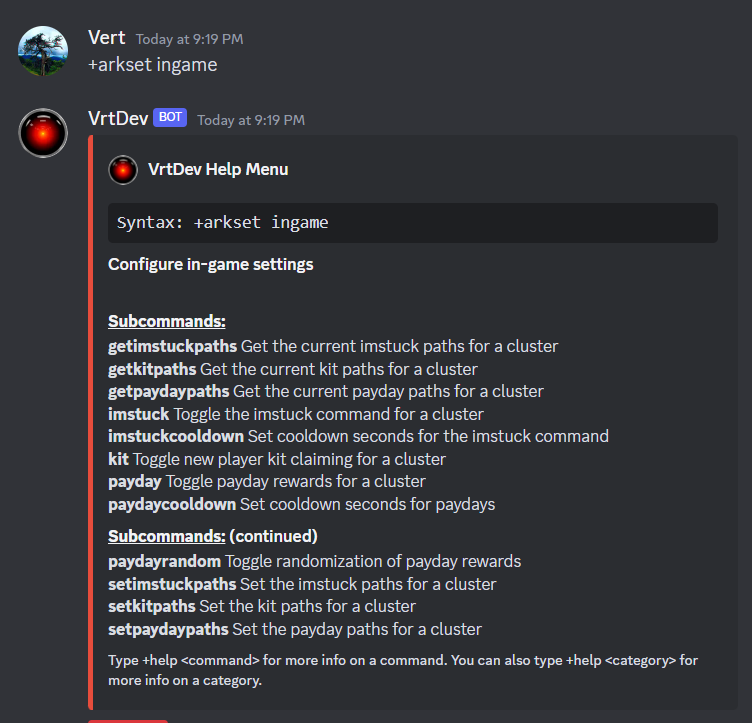
- In-game systems (
+viewserversto configure):Interchatsyncs chat across every map in a cluster;Kitgives new players a one-time starter kit;Imstuckhands stuck players a respawn care package;Paydayrewards players on a timer. Set the item paths with+arkset ingame.
- ArkView plugin - unlocks map and investigation commands like
+hunt,+findtame,+structures,+mapstats, plus detailed tribelogs. Get ArkView, then set the Host/Port under a server in+viewservers. - Mapvote - toggle in-game voting commands per map with cooldowns.
- Shop Setup - an automated RCON item shop for players.
- Xbox/Crossplay Tools - authenticate a host Gamertag for auto-friend and alt detection (ASE Microsoft Store).
¶ 🎉 What's Next?
- Quick Reference - All essential commands in one place
- Ark RCON Commands - Full raw game console command reference
- FAQ & Troubleshooting - Solutions to common issues
- Premium - Compare Free vs Premium features
Need help? Join the Discord Support Server!